
WhatsApp Setting Change Can Stop Photos and Videos From Filling Your Phone Storage
A simple WhatsApp setting change can stop unwanted photos and videos from filling your phone storage while keeping your gallery clean and organized.
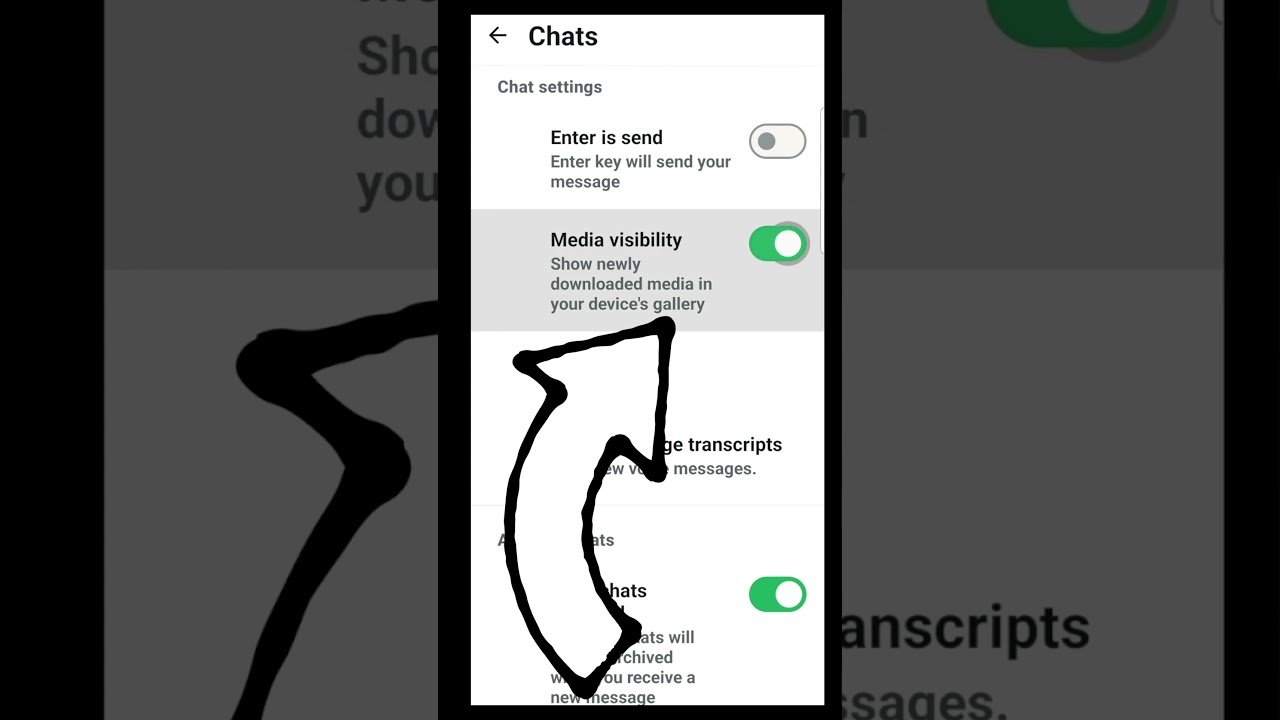
Many smartphone users often face storage problems because of the large number of photos and videos received through WhatsApp chats and groups. The messaging app automatically saves media files to the phone gallery by default, which can quickly consume storage space and make it difficult to manage personal pictures.
The issue is especially common for users who are part of multiple active groups where hundreds of images, videos and documents are shared regularly. Apart from reducing available storage, automatic media saving can also create privacy concerns because every downloaded file becomes visible in the phone gallery.
WhatsApp already provides built in options that allow users to control how media files are downloaded and displayed. By changing a few settings, users can prevent unwanted images and videos from appearing automatically while keeping important files accessible when needed.
To manage automatic downloads, users need to open WhatsApp on their smartphone and go to the Settings section by tapping the three dot menu on the top right corner. After entering the settings page, they need to select the Storage and Data option, where media download preferences are available.
Inside this section, WhatsApp provides separate controls for photos, videos, audio files and documents. Users can decide whether these files should download automatically through mobile data, WiFi or other network options. Those who want to avoid unnecessary downloads can disable these options completely and manually download important media whenever required.
Another useful feature is the Media Visibility setting, which allows users to stop photos and videos from specific chats or groups from appearing in the phone gallery. To activate it, users can open a chat or group, tap on the contact or group name and turn off the Media Visibility option.
This setting can be applied individually to different conversations, making it easier to manage personal chats separately from busy groups. For example, users can keep family photos visible while hiding media from promotional groups or frequently active communities.
After making these changes, users should check their phone gallery once to understand the difference. New WhatsApp photos and videos from selected chats will no longer automatically appear in the gallery, helping keep storage organized and reducing unnecessary clutter.
Changing these simple WhatsApp settings can improve the overall smartphone experience by saving storage space, reducing unwanted downloads and offering better control over personal media. Users can also review existing WhatsApp files and delete old unnecessary content to free up additional space on their devices.