
How to Report Accidents and Road Blockages on Apple Maps Without Touching Your iPhone
Apple Maps lets users report accidents, construction, traffic and road hazards through Siri, helping drivers share important updates without handling their iPhone.
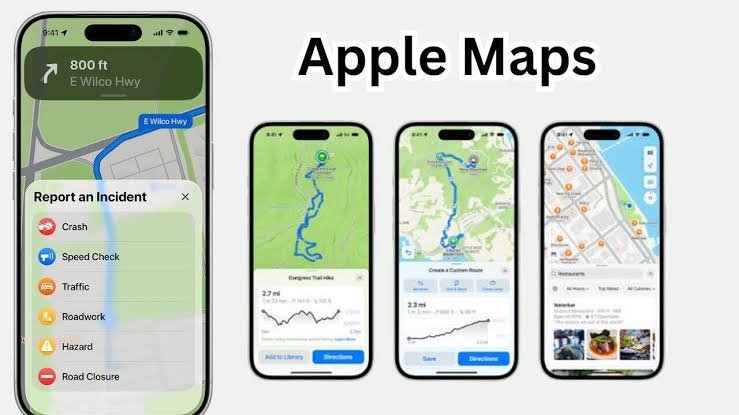
Apple Maps is designed to keep people informed about changing road conditions, including accidents, construction work, traffic problems, road closures and other hazards. What makes the feature particularly useful is that iPhone users do not necessarily need to pick up their phone to submit a report.
On compatible iPhones running iOS 14.5 or later, Siri can be used to report an incident while Apple Maps is open. This allows drivers to communicate what they have seen using a voice command rather than interacting with the screen.
For example, if an accident is spotted on the road, a user can tell Siri that they have just seen a crash. Similarly, a driver can report construction work or another obstruction by describing the situation to Siri. The available reporting options can vary depending on the location.
The feature can also be useful when an earlier road report is no longer accurate. If a construction site has been cleared or a previously reported problem has disappeared, users can provide an update through Siri so that the information shown on Apple Maps can reflect the latest situation.
No special setting needs to be enabled for this functionality when the iPhone is running iOS 14.5 or a newer version. With Apple Maps open, users can simply use Siri to submit an appropriate road incident report.
There is another option for passengers or people who are not driving. If someone is sitting in the passenger seat and is able to safely use the iPhone, they can report an incident directly through Apple Maps.
To report an incident while following turn by turn navigation, users can tap the incident button displayed on the map. The button appears as a speech bubble with an exclamation mark. Another route is to open the route card and select the option to report an incident.
Apple Maps then provides different categories from which users can select the relevant problem. These can include a crash, traffic, road work, a road closure or a hazard.
Users who are not currently following a route can also access the reporting feature through Apple Maps. They can open the Maps profile menu, go to the reporting section and select the option for reporting a new issue before choosing the relevant incident category.
Updating an existing report is similarly straightforward. When an incident marker appears on the route, users can indicate whether the reported problem is still present or has been cleared. This helps Apple Maps determine whether the earlier warning remains relevant.
For drivers, the main benefit of Siri based reporting is convenience. Instead of reaching for the phone while navigating, they can use voice commands to communicate a road issue. Keeping attention on the road remains important, so any interaction with the phone should be avoided while driving unless it can be done safely through the vehicle’s hands free system.